








You ever posted a stunning video on Instagram—maybe a product demo, a crisp testimonial, or a behind-the-scenes moment—and it looked all… wrong? Cropped weirdly. Pixelated. Or worse, Instagram just refused to upload it. Yeah, it’s frustrating. Especially when you’re juggling a million things as a digital marketer, SEO analyst, or content strategist.
But let’s cut to the chase: knowing your Instagram video sizes isn’t optional anymore—it’s survival.
Why Video Size Even Matters
Sure, you want your brand to “look good”—but this isn’t just vanity. It’s ROI. Bad formatting messes with your engagement rates, and that’s a hard pill to swallow when you’re spending time (and budget) on content production.
Think of it this way: uploading the wrong video size is like printing your billboard on a napkin. Technically, the message is there, but no one’s stopping to squint at it.
And with Instagram favoring video content—especially Reels—in the algorithm game, your video specs are the difference between getting buried or going viral.
Let me explain how to never get that “this video can’t be uploaded” error again.
Reel Talk: The Instagram Video Types You Should Know
Before we talk numbers, let’s quickly cover the three main formats you’re likely working with:
- Reels – Instagram’s answer to TikTok. These are vertical, fast-paced, and getting algorithmic love.
- Feed Videos – Classic in-feed content. Often square, sometimes landscape.
- Stories – Ephemeral but impactful. 24-hour shelf life, but the right story can boost DMs and conversions.
- IGTV – Okay, technically still around, but it’s kind of faded into the background. Instagram now merges longer videos into the feed and Explore section.
Each of these has different requirements—and yes, even a few hidden “gotchas.”
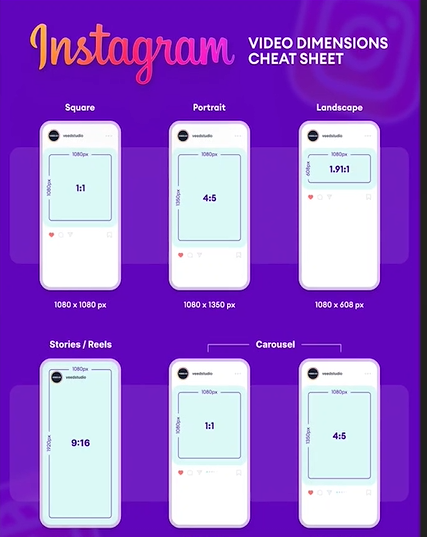
The Specs Sheet (That You Should Probably Bookmark)
Reels & Stories:
- Aspect Ratio: 9:16 (aka full-screen vertical—think how you hold your phone)
- Resolution: 1080 x 1920 pixels
- File Size: Max 4GB
- Length:
- Reels: Up to 90 seconds
- Stories: Up to 15 seconds per clip (but you can stitch up to 4 into a minute)
Feed Videos:
- Square (1:1): 1080 x 1080 px
- Portrait (4:5): 1080 x 1350 px – most engagement-friendly for mobile
- Landscape (16:9): 1080 x 608 px
- Length: Up to 10 minutes for regular accounts (60 minutes for verified/large accounts)
Format Tips:
- Use .MP4 (H.264 codec, AAC audio) for smoother playback.
- Don’t forget the thumbnail—Instagram lets you choose, but an off-center frame can ruin the first impression.
Hidden Pitfalls Nobody Warned You About
Here’s where things get tricky. Instagram compresses your videos. A lot. That 4K masterpiece you spent two hours editing? Instagram will squash it into something that sometimes looks like it was filmed on a flip phone from 2006.
So, what’s the workaround? Export at the highest quality possible within Instagram’s specs. If you’re editing in Adobe Premiere Pro or Final Cut, keep the bit rate close to 5,500 kbps for HD. It won’t be perfect, but it’ll survive the Instagram squeeze.
Also: always shoot with your final platform in mind. Shooting wide landscape for YouTube and trying to crop it into vertical for Reels? You’ll lose half the action—and maybe your patience.
Format Isn’t Just Technical—It’s Psychological
Let’s talk human behavior for a second. Vertical video (like Reels and Stories) feels intimate—it’s how people naturally hold their phones. It’s personal, like FaceTiming a friend. That’s why vertical formats tend to feel more authentic and get better engagement.
Horizontal video? Still works—especially for cinematic or wide-angle content—but on Instagram, it looks a little… formal. You’ve got to pick your battles. Selling emotion? Go vertical. Selling precision? Maybe lean horizontal.
But What About Captions, Tags, and Thumbnails?
Ah, the holy trinity of Instagram optimization. You could have the most beautifully formatted video in the world, but if the caption is dry, or the thumbnail is blurry, you’re toast.
Here’s what smart marketers do:
- Add burned-in captions. 80% of people watch videos on mute—so subtitles aren’t a nice-to-have, they’re essential.
- Use eye-catching thumbnails. Especially for Reels that show up on the profile grid.
- Include 3–5 relevant hashtags (don’t overdo it), and remember: hashtags in the caption > hashtags in the comments now.
- Keep text away from the edges—Instagram’s UI overlaps buttons there.
The Tools That Make Life Easier (Because You’re Busy)
Honestly, no one has time to memorize pixel sizes. Use these:
- Canva – for quick, pre-sized video templates
- InShot – for on-the-go video resizing
- CapCut – for editing Reels with TikTok-style effects
Automation isn’t lazy—it’s smart. Especially when juggling multiple campaigns and clients.
Final Thoughts: It’s Not Just About the Pixels—It’s the Experience
Look, nailing the right Instagram video size isn’t just a box to tick. It’s part of how you show up online. It’s about respecting the platform, the viewer, and—let’s be honest—your own creative hustle.
So next time you’re prepping content for that campaign, remember: a perfectly sized video is like a tailored suit. It just fits better. And people notice.You’ve got the story, the style, and the message. Now, just make sure the dimensions match the vision.